
12-Week Term Dates and Deadlines
Spring 2026 | 12-Week Term
| Event | Date |
|---|---|
| Schedule of Classes available | Sep 19, 2025 (Fri) |
| Registration appointment and blocks available Students can view the day and time that they can first register and see any registration blocks they may have. This is not an appointment with an academic advisor or Office of the University Registrar but is the earliest time that a student can log into Testudo Drop/Add to register for classes. Students should start preparing for registration by reviewing the Steps to Register. |
Oct 10, 2025 (Fri) |
| Graduate student registration begins Returning students may make changes to their schedule by adding and dropping classes. No appointment required. New students will register at their orientation. |
Oct 30, 2025 (Thu) |
| Last day to apply for May 2026 graduation | * Feb 13, 2026 (Fri) |
| Last day to cancel registration Last day to withdraw from all courses (cancel registration) with a 100% refund. |
Mar 1, 2026 (Sun) |
| First day of classes Late registration begins on the first day of classes. All students initiating registration for the semester on or after this date will be assessed a $20 late registration fee. |
Mar 2, 2026 (Mon) |
| Schedule adjustment period Returning students may make changes to their schedule by adding and dropping classes. No appointment required. New students will register at their orientation. |
Mar 2, 2026 (Mon) - Mar 10, 2026 (Tue) |
| Last day to drop a course with 100% refund For students who want to drop individual courses, but remain registered (if you are dropping all courses, refer to withdraw from all courses deadlines). Refer to Refund Schedule for Drops for Graduate Students for additional information. |
Mar 5, 2026 (Thu) |
| Last day to drop a course with 80% refund For students who want to drop individual courses, but remain registered (if you are dropping all courses, refer to withdraw from all courses deadlines). Refer to Refund Schedule for Drops for Graduate Students for additional information. |
Mar 6, 2026 (Fri) |
| Last day to add a course | Mar 10, 2026 (Tue) |
| Last day to withdraw from all courses with 80% refund Students may request a withdrawal from all classes at any time between the first and the last day of classes of the 12-week term. |
Mar 10, 2026 (Tue) |
| Spring Break - No classes | Mar 15, 2026 (Sun) - Mar 22, 2026 (Sun) |
| Last day to withdraw from all courses with 60% refund Students may request a withdrawal from all classes at any time between the first and the last day of classes of the 12-week term. |
Mar 23, 2026 (Mon) |
| Last day to withdraw from all courses with 40% refund Students may request a withdrawal from all classes at any time between the first and the last day of classes of the 12-week term. |
Mar 26, 2026 (Thu) |
| Last day to withdraw from all courses with 20% refund Students may request a withdrawal from all classes at any time between the first and the last day of classes of the 12-week term. |
Apr 1, 2026 (Wed) |
| 12-week registration deadlines Last day to drop a course, change course credit level and change grading method. |
Apr 27, 2026 (Mon) |
| Last day of classes | May 18, 2026 (Mon) |
| Last day to withdraw from all courses with 0% refund Students may request a withdrawal from all classes at any time between the first and the last day of classes of the 12-week term. |
May 18, 2026 (Mon) |
| Commencement - College and department ceremonies | May 19, 2026 (Tue) - May 22, 2026 (Fri) |
| Commencement - Main ceremony | May 20, 2026 (Wed) |
| Degree conferral date Official degree award date for the Spring 2026 semester |
May 20, 2026 (Wed) |
| Final grades due | May 21, 2026 (Thu) |
| Official transcripts available with Spring 2026 12-week term grades and GPA's | May 26, 2026 (Tue) |
| Degree clearances due | Jun 10, 2026 (Wed) |
| Official transcripts available with May 2026 degree Degrees earned in the Spring 2026 semester appear on student records |
Jun 11, 2026 (Thu) |
Advisor Calendar
On this page:
Fall & Spring Semesters |
| Printer-friendly version for Fall & Spring |
Summer & Winter Terms |
| Printer-friendly version for Summer & Winter |
12-Week Terms
Calendars
Official University Calendar
Student Dates and Deadlines
Fall & Spring Semester
Course drop/add (schedule adjustment) and withdrawal dates for the standard fall and spring semesters
Summer Session
Course drop/add (schedule adjustment) and withdrawal dates for summer sessions
Winter Session
Course drop/add (schedule adjustment) and withdrawal dates for the winter session
12-Week Term
Course drop/add (schedule adjustment) and withdrawal dates for programs that follow the 12-week term calendar
Non-Standard Courses
Course drop/add (schedule adjustment) and withdrawal dates for non-standard courses that do not follow the semester, summer, winter, or 12-week term calendars
Residency Reclassification (for In-State Tuition) Petitions
Deadlines that apply to students filing a Petition for Change in Classification for Tuition Purposes
Faculty and Staff Dates and Deadlines
Advisor Calendar
Administrative dates and deadlines for semesters, summer sessions, winter session, and 12-week terms
Scheduling Calendar
College and department academic schedulers can find dates and deadlines related to course and classroom scheduling
Myhub
The University of Maryland has partnered with the National Student Clearinghouse (NSC) to provide official enrollment certifications and degree verifications. NSC Myhub dashboard allows students to obtain these documents and their official transcripts in one convenient place. The benefits of Myhub include:
- Convenient 24/7 access
- Immediate download of enrollment certifications, degree verifications, and good student discount certificates
Students Enrolled at UMD after Fall 2000 with a Directory ID and Passphrase
- Go to NSC Myhub.
- Login with Directory ID and passphrase.
- NSC requires multi-factor authentication which will need to be completed.
- After successful login, you will be directed to the Myhub Dashboard. Select Enrollment History to view your enrollment terms at UMD.
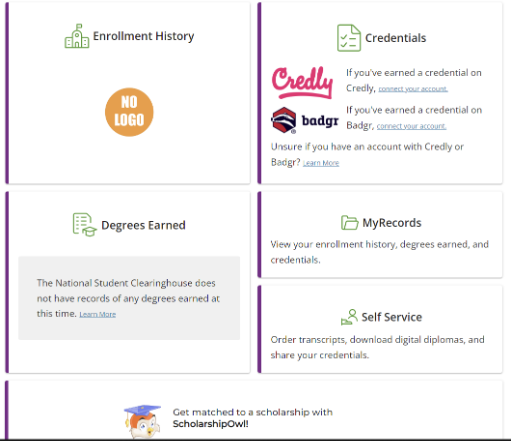
- Choose the Enrollment History tab for enrollment certifications and good student discount certificates, and the Degrees Earned tab for degree verifications.
- Expand the box by clicking on the down arrow to view and select the term (as per the term dates) for which you would like to obtain a certification/certificate/verification.
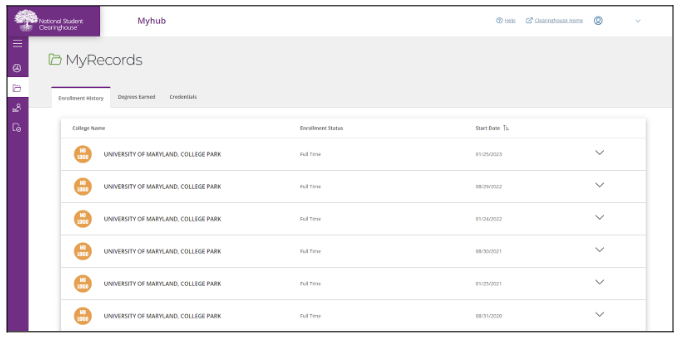
- Expand the box by clicking on the down arrow to view and select the term (as per the term dates) for which you would like to obtain a certification/certificate/verification.
- Select Download Certificate to view your options for enrollment certifications and good student discount certificates.
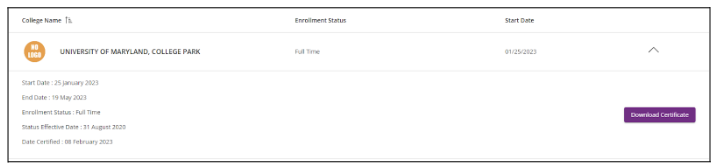
- Select the type of certification/certificate in which you are interested from the drop down box and hit Download.
- Your certification/certificate is now available as a PDF. You can view, save, and send it to the recipient of your choice.
- Note: Upon review of your certification/certificate, if you need additional information (e.g. GPA) that is not on this document from the NSC, please log into Testudo to request documentation containing the additional information.
- Please take note that you can also order your official University of Maryland transcript from this page. To do so, click the Order Transcript button right next to the Download box. This will take you to the NSC transcript ordering site.
Candidate Clearance Online
Candidate Clearance Online is used to clear undergraduate students for the degree or certificate.
Information on requesting access to this system can be found on the Systems Access page
Candidate Clearance Online is available at candidate-clearance.umd.edu.
Active Military Duty
Paying for Your Education
Active Military Duty may use VA Education Benefits and/or Tuition Assistance to pay for tuition and fees.
- For information on the VA enrollment certification process at UMD, see Using VA Benefits.
- To use Tuition Assistance, have the course/s approved through the appropriate military tuition assistance program (e.g., GoArmyEd for Army service members). Once the necessary military command signatures and dollar amount for Tuition Assistance have been obtained, take the TA Approval Letter/Statement directly to Student Financial Services and Cashiering - Third Party Billing.
Residency Classification
For information regarding residency reclassification and military exemptions, please go to Residency Reclassification Services.
Military Call-up
It is the intent of the University of Maryland, College Park, to facilitate the withdrawal or change in registration and the reenrollment of students who are called to active duty in the U.S. armed forces. The university policy governing military call-ups ( policy V-7.00) allows for a variety of unique solutions not covered by standard academic policies (such as receiving Incompletes in some classes while retro-withdrawing from others leading to a partial refund; or receiving a total refund of tuition and fees) which minimize the effects of time and financial investment put into a semester in-progress once called to active military service.
Steps for Students Called to Active Military Service
- Students (or their representative) will need a copy of the military orders.
- Students should meet with their college's advising office. Based on the specific course(s) in which the student is enrolled and the point in the semester when the call-up occurs, students may be advised to discuss Incomplete Contracts with individual instructors, or to process a withdrawal with the Office of the University Registrar, Room 1113 C. Mitchell Building.
- The Office of the University Registrar will make determinations as to appropriate withdrawal procedures and refunds and explain the process for reenrollment after completing active duty. They will also assist with quick referrals related to financial aid issues, cancellation of any campus housing contracts, and allowable refunds.
Withdrawal for active military service will have no effect on any subsequent request to withdraw from the university. Students may reenroll upon completion of their tour of duty.
Student Privacy (FERPA)
The Family Educational Rights and Privacy Act (FERPA) is a federal law that protects a student’s privacy interest in their education records. FERPA provides that educational institutions, such as postsecondary institutions, may disclose education records, or personally identifiable information from such records, only if an eligible student has provided prior written consent, except in several specified circumstances policy III-6.30(A).
The University of Maryland adheres to the policy of compliance with the Family Educational Rights and Privacy Act (FERPA):
- To permit students to inspect their educational records.
- To limit disclosure to others of personally identifiable information from an education record without the student's prior written consent.
- To provide students the opportunity to seek correction of their educational records where appropriate.
- Prior consent will not be required for disclosure of an educational record to school officials of the University of Maryland who have been determined to have legitimate educational interests.
- Certain information has been designated "Directory Information" and will be disclosed without prior consent unless a student files written notice. Directory information includes, but is not limited to: name, address, telephone, email, date and place of birth, major field of study, full-time/part-time status, participation in officially recognized activities and sports, weight and height of members of athletic teams, dates of attendance, degrees and awards received, most recent previous educational agency or institution attended.
Students who wish to limit the disclosure of Directory Information or wish access to their official records should obtain the appropriate form, fill it out, and return it to the Office of the University Registrar Front Counter Services, Clarence M. Mitchell, Jr. Building, first floor. Students alleging university noncompliance with the Family Educational Rights and Privacy Act may file a complaint with the Student Privacy Policy Office.
Faculty/Staff/Student Employees
Faculty, staff and student employees must complete UMD's FERPA tutorial prior to being granted access to UMD's student systems.
Change of Personal Information
Students can use My Profile in Testudo to update address, phone numbers, emergency contact information, and gender marker since supporting documentation is not required. To learn more about changing your gender marker, refer to Gender Marker FAQs.
To update other personal information, submit the appropriate form and documentation to the Office of the University Registrar. Each type of change request requires supporting documentation, one of which must include a photograph of the student (driver's license, UMD ID card, or passport). Submitting any change request form without the required supporting documentation will result in processing delays.
Students can also process these changes in-person by visiting the Office of the University Registrar Front Counter on the First Floor of the Clarence M. Mitchell, Jr. Building. The forms will be available for you to fill out, but make sure to bring paper copies of the official documents.
| Pictures of documents on a device will not be accepted. |
On this page:
Name Change or Correction
Requests for name changes must be submitted to the Office of the University Registrar.
At UMD, your "primary name" and "legal name" are different.
- Your primary name is the name by which you are generally known. It appears on university identification cards, class rosters, student directory and various student campus systems.
- Your legal name appears on government-issued identity documents such as a passport. At UMD, your legal name must appear on official transcripts, financial aid documents, payroll documents, and other places where a legal name is required by law or university policy.
Unless you specify otherwise, your default primary name is your legal name.
If your primary name and legal name are the same and need to be changed or corrected:
- Complete the Name/DOB Change Request .
- Provide two types of supporting documents with the correct name, one of which must contain a photograph:
- Driver’s license
- Passport
- Court-issued document
- Birth certificate
- Marriage certificate
- Submit request and supporting documentation through our Secure File Upload.
If your primary name and legal name are not the same and need to be changed or corrected:
- Complete the Primary Name Change Request .
- Provide two types of supporting documents with your legal name, one of which must contain a photograph:
- Driver’s license
- Passport
- Court-issued document
- Birth certificate
- Submit request and supporting documentation through our Secure File Upload.
Date of Birth Correction
Requests to correct your date of birth should be submitted to the Office of the University Registrar.
- Complete the Name Change/DOB correction Request .
- Provide supporting documents with the correct date of birth, one of which must contain a photograph:
- Driver’s license
- Passport
- Birth certificate
- Submit request and supporting documentation through our Secure File Upload.
Social Security Number Correction
Requests for social security number (SSN) changes must be submitted to the Office of the University Registrar.
- Complete the Social Security Number Change Request .
- Provide a copy of your Social Security card and a government-issued document with photograph.
- Submit request and supporting documents through our Secure File Upload.
Secure File Upload
Use this tool to securely upload your documentation for change of personal information requests to the Office of the University Registrar.
Box is a secure, cloud-based storage and collaboration service supported by the Division of Information Technology. View the UMD Box article for additional information.
FERPA & Confidentiality
The University of Maryland adheres to the policy of compliance with the Family Educational Rights and Privacy Act (FERPA).
Parent/Guardian Access
Students may grant limited parent/guardian access to their record.
Mid-Term Grades
To support a student's transition to the University of Maryland, instructors are required to submit mid-term grades for undergraduate students per policy III-6.00(B). These grades are an important component of student success, as they provide timely feedback to students about the university’s academic expectations. Mid-term grades are not recorded on the student’s academic transcript.
Mid-Term Grades are used:
- To inform students of their performance in the course at the midway point of the semester.
- By academic advisors to intervene with students who may need additional assistance.
Visit How to View Grades and GPAs for information on how to view your mid-term grades.